

New workspace? Start with Quickstart. Running today’s jobs? Start with Daily Operating Rhythm.
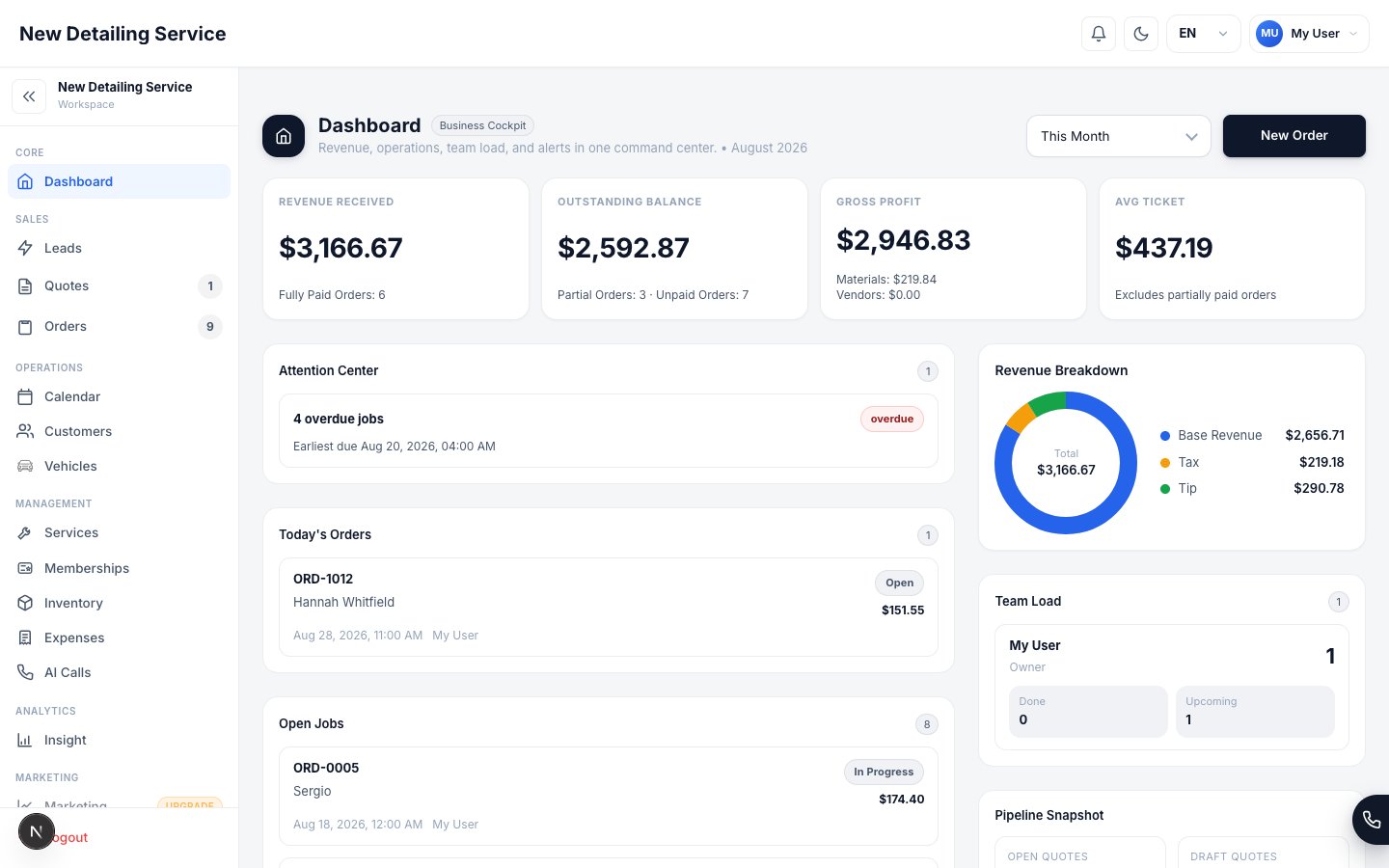
Your dashboard — revenue, open jobs, and what needs attention, all in one view.
Choose your path
Start here
Quickstart
Learn what the CRM includes, how the workflow fits together, and where to begin.
Workspace Tour
See how the live app is organized across dashboard, sales, operations, management, analytics, settings, and support.
First order walkthrough
Follow the fastest setup path from business settings to customer, quote, order, and payment.
Dashboard
Learn how the dashboard works as Business Cockpit, Operations Console, and My Day.
How it all fits together
See the daily flow from first contact to a paid, reported job.
Daily Operating Rhythm
Run morning triage, active jobs, handoff, and end-of-day review from the right screens.
Trust Center
How we protect your data, your customers’ info, and your payments.
Sales
Capture and manage leads
Track incoming leads, change statuses, filter by source, and convert qualified leads into customers or orders.
Send quotes
Build quotes, include one or more vehicles, and move approved work into orders.
Collect a quote response
Publish a protected link and collect approval, decline, or requested changes against the exact revision reviewed.
Run active orders
Manage job status, materials, signatures, invoices, and completion.
Payments
Learn how Stripe, payment links, QR payments, manual methods, and partial payments work.
Operations
Calendar
Schedule jobs, reschedule work, and manage team visibility.
Customers
Store contact details, job history, linked vehicles, and customer communication details.
Vehicles
Save make, model, VIN, plate, and body type so pricing stays accurate.
Customer portal
See one customer’s vehicles, memberships, and history in a single view.
Management
Services and pricing
Configure service catalog, base pricing, and body-type adjustments.
Staff and roles
Invite staff, assign roles, manage shifts, and control access.
Roles and permissions
Control exactly what each team member can see and do.
Inventory
Track consumables, low stock, and material cost impact on completed jobs.
Vendors and expenses
Track subcontractors and outside costs for true profit per job.
Memberships
Turn one-time customers into recurring revenue.
Marketing
Manage sources, campaigns, spend, attribution tokens, and marketing performance views.
Growth and automation
Website Integration
Connect forms, WooCommerce, hosted booking, and native website booking.
Online Booking
Configure one booking backend for the hosted page and your own website.
Scheduling & Availability
Set the shared hours, capacity, resources, and booking rules used by Online Booking and AI booking.
Text notifications
Configure reminder and review-request SMS templates, usage, and optional custom Twilio credentials.
AI assistant
Configure voice, model, prompt, actions, transfer rules, and AI call workflows.
AI call history
Review calls handled by the AI Voice Assistant, with transcripts, summaries, recordings, and actions.
Integrations
Connect Stripe, Google Calendar, messaging, AI, and your website.
Analytics
Insights and reports
Review revenue, COGS, taxes, profit, staff performance, and service performance.
System and account
Order management
Configure quote and order prefixes, numbering length, and next counter values.
Payment methods
Add manual payment methods and control which options are active in your workspace.
User security
Manage password changes, two-factor authentication, and connected calendars.
Import customer data
Bring existing customer records into the CRM with CSV import.
Export data
Export CSV reports for bookkeeping, accounting, or deeper analysis.
Account and billing
Review plan status, seats, limits, modules, entitlements, upgrades, and billing controls.
Mobile
The iOS app runs the same workspace as the web app — orders, calendar, customers, sales, catalog, reporting, and settings all work on the phone.Mobile Overview
How the app is organized and which modules run natively on the phone.
Getting started on mobile
Install the app, sign in to your workspace, and learn the navigation.
Orders on mobile
Find, create, and update orders, and collect payment in the field.
Tap to Pay
Collect in-person card payments on iPhone when Stripe is connected.
VIN & plate scan
Identify a vehicle with the camera instead of typing it in.
Photo Documentation
Capture before-and-after photos and attach damage documentation to an order.
Need Help?
FAQ
Find quick answers about login, payments, imports, and account questions.
Troubleshooting
Resolve common issues with Stripe, Tap to Pay, CSV import, inventory, and permissions.
Security and data protection
Review the basics of access control, payment security, and data handling.