

Signing in
Your account is protected by a trusted, industry-standard sign-in system.- You can sign in with email and password, and workspaces may also enable Google or Apple sign-in.
- New Google or Apple signups still complete phone verification before a CRM workspace is created.
- If a provider email already belongs to an existing CRM account, the CRM asks you to prove access to that account before linking the provider.
- New email/password accounts require at least 8 characters with no whitespace, including an uppercase letter, lowercase letter, number, and symbol. Signup shows strength feedback while the server independently enforces the policy.
- We never see or store your raw password. It’s protected the moment you create it, and even our team cannot read it.
- If you forget it, you reset it through a secure email link — nobody emails you your old password, because no one has it.
- Signing out ends your session. When you log out, that device can’t get back in without signing in again.
Two-factor authentication (2FA)
Two-factor authentication adds a second step to logging in: after your password, you enter a short code from an authenticator app on your phone. Even if someone learned your password, they couldn’t get in without your phone. 2FA is optional and set per account. You can turn it on yourself.1
Open your security settings
Go to Settings → User Security.
2
Turn on two-factor authentication
Follow the prompts to scan a code with an authenticator app (like Google Authenticator or Authy).
3
Save your backup option
Keep your recovery information somewhere safe so you’re never locked out.
Who can see what
Not everyone on your team needs access to everything. Auto Detailing CRM uses roles so each person sees only what their job requires.
Beyond these roles, you can fine-tune permissions area by area. Learn more in Roles & Permissions.
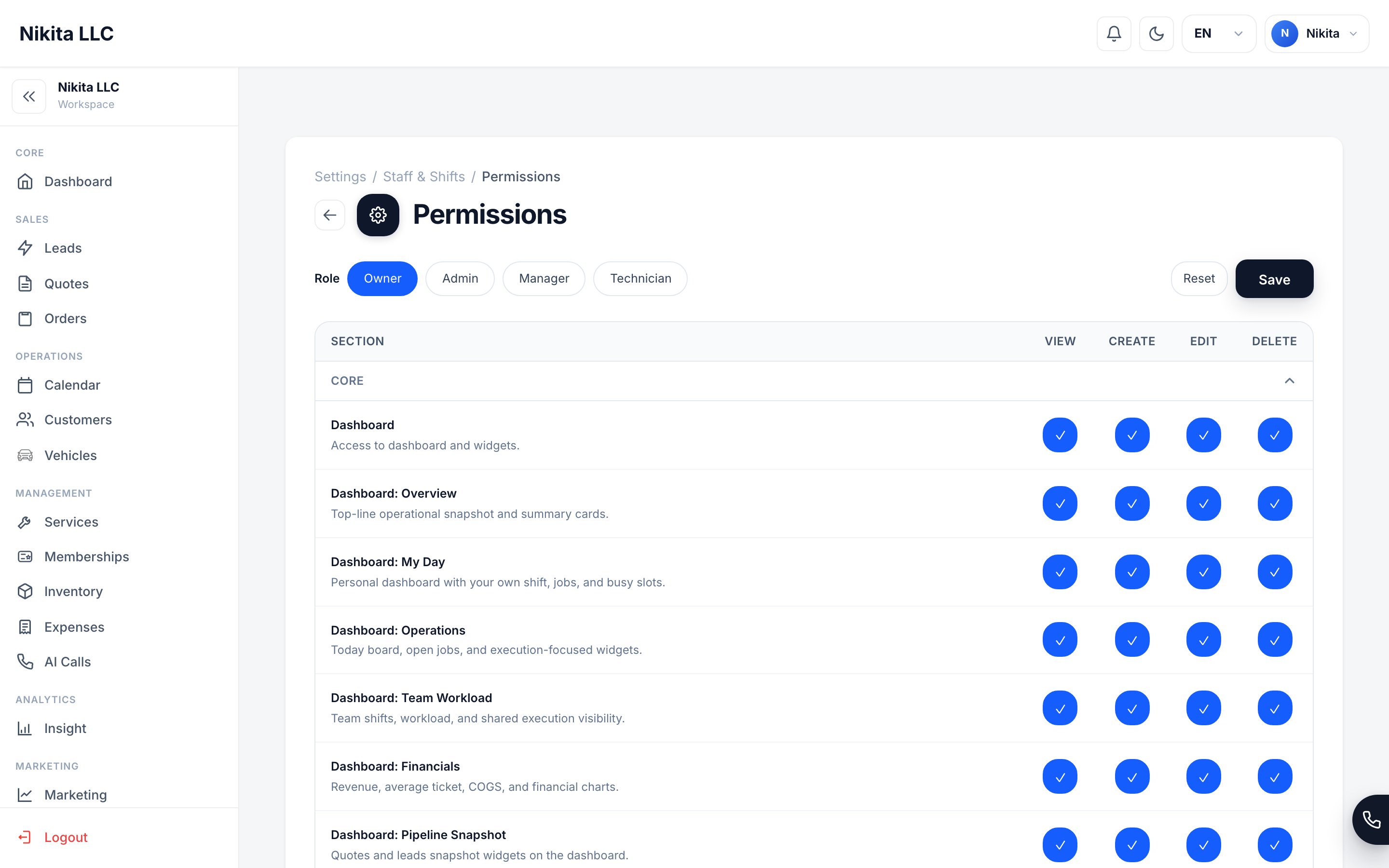
Set exactly what each role can view, create, edit, and delete — area by area.
Technicians see only their assigned jobs — so a part-time detailer never sees your full customer list, pricing strategy, or financials unless you choose to share it.
Your data stays separate
When many businesses use the same software, the most important promise is separation: your records are private and are never visible to any other business using Auto Detailing CRM. Your customers, orders, pricing, and reports belong to your workspace alone.Safe files and forms
The CRM checks the things people upload and send before trusting them.- Uploaded images are verified — the system confirms a file is genuinely an image (like a real photo) before accepting it, and rejects files pretending to be something they’re not.
- Payment notifications are verified — when your payment processor tells the CRM “this payment succeeded,” the CRM confirms the message is genuinely from the processor before acting on it.
For the technically curious
For the technically curious
Every connection between your browser or phone and Auto Detailing CRM is encrypted using HTTPS (TLS) — the same kind of secure connection your bank’s website uses — so information can’t be read while it travels over the internet.Security is layered: protected sign-in, role-based access, private separation of each business’s data, verified uploads, and verified payment notifications all work together so that no single point has to carry the whole load.
Data & Privacy
What we collect and what you can do with your data.
User Security settings
Change your password, turn on 2FA, manage sessions.
Roles & Permissions
Control exactly what each team member can see and do.
Payments & Card Security
How card data is protected.